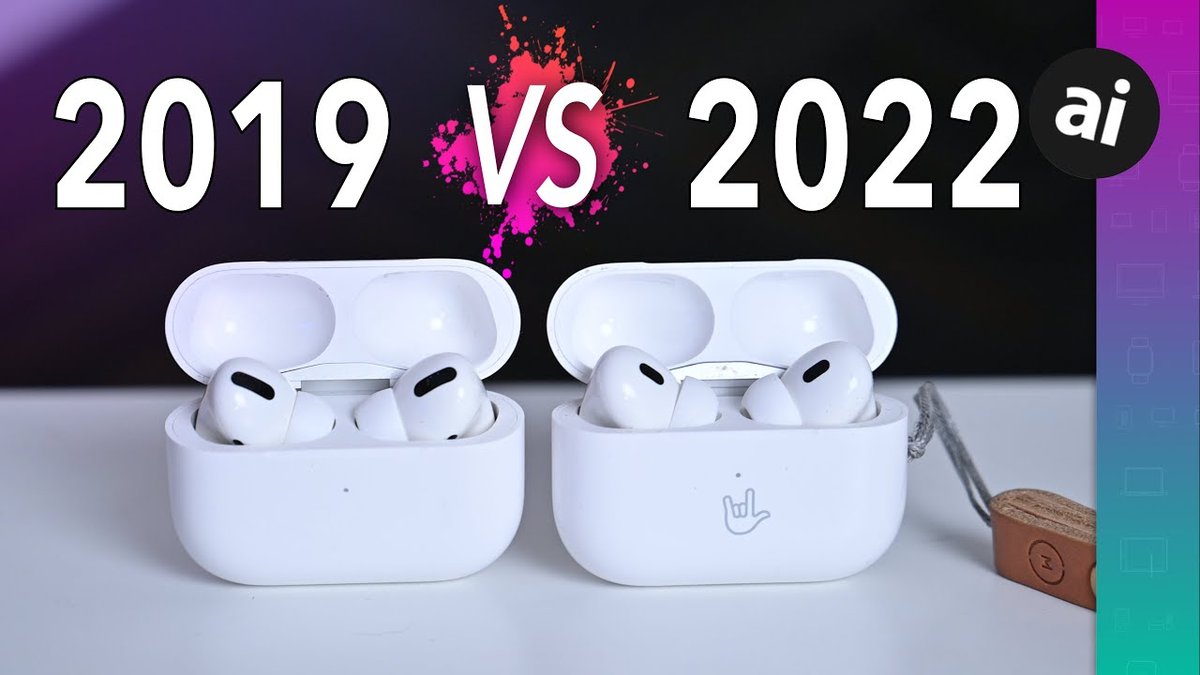
Staying on top of your tech's maintenance isn't always glamorous, but it’s crucial for peak performance. When it comes to your beloved AirPods Pro 1st Gen software updates and compatibility, understanding the latest developments ensures your premium earbuds continue to deliver the best possible audio experience. Just recently, Apple rolled out new firmware, bringing subtle yet impactful improvements to your first-generation AirPods Pro.
If you’ve been wondering what these updates mean for your daily listening, or if your trusted earbuds are still keeping pace with Apple’s latest innovations, you've come to the right place. We're diving deep into the often-invisible world of AirPods firmware, dissecting the latest releases, and guiding you through what you need to know to keep your audio journey seamless.
At a Glance: Your AirPods Pro 1st Gen Updates
- Latest Firmware: Version 6.5 (build 6F21) as of October 22, 2024, following 6A326 (June 25, 2024) and 6.0 (6A321) released January 23, 2024.
- Automatic Installation: Updates happen automatically when your AirPods Pro are charging in their case, close to a connected iOS device (iPhone or iPad).
- No Release Notes: Apple does not provide public changelogs for AirPods firmware, but updates typically include performance enhancements, bug fixes, and stability improvements.
- Manual Updates Not Possible: You cannot manually trigger an AirPods firmware update.
- Compatibility: Your AirPods Pro 1st Gen remain compatible with the latest iOS/iPadOS versions, ensuring continued functionality with modern Apple devices.
The Invisible Evolution: Why AirPods Pro Updates Matter
Unlike your iPhone or Mac, where you actively download and install system updates, AirPods firmware updates occur almost entirely behind the scenes. There's no "Update Available" pop-up, no progress bar, and often, no official announcement from Apple detailing what's changed. This silent process can lead many users to overlook the importance of these updates.
Yet, these seemingly minor tweaks are vital. They are designed to refine everything from audio quality and active noise cancellation to battery management and connection stability. Think of it as a continuous tune-up for your high-performance audio gear, ensuring your Original Apple AirPods Pro continue to sound their best and integrate seamlessly with your Apple ecosystem.
Decoding the Latest: Firmware 6.0, 6A326, and 6.5 Arrive
The first generation of AirPods Pro has seen a steady stream of firmware enhancements, even years after its initial release. This commitment from Apple ensures that even their slightly older hardware benefits from ongoing optimizations.
The Recent Release: What We Know
On January 23, 2024, Apple released firmware version 6.0 (build 6A321) for the first-generation AirPods Pro. This was a notable update, following a similar update cycle for the second-generation AirPods Pro which received its 6.1.34 firmware in December. While Apple, true to form, didn't publish specific release notes, the pattern of these updates strongly suggests they bring core performance improvements and address various bugs.
Following this, further builds have been rolled out:
- 6A326 on June 25, 2024.
- Version 6.5 (build 6F21) on October 22, 2024, which is the latest firmware at the time of writing.
These incremental updates are common. They often fine-tune algorithms for audio processing, enhance the responsiveness of features like Adaptive Transparency, or bolster the reliability of Bluetooth connectivity. For instance, subtle improvements in how your AirPods Pro handle mastering noise cancellation in different environments might be packaged into these updates, even without explicit mention.
Your AirPods Pro's Digital ID: How to Check Your Firmware Version
Since you can't manually initiate an update, verifying your current firmware version is the only way to know if your AirPods Pro are running the latest software. It's a quick, straightforward process that takes just a few taps on your iPhone or iPad.
Here’s your step-by-step guide:
- Ensure Connection: Make sure your AirPods Pro are connected to your iPhone or iPad. You don't need to be wearing them, but they should be in their charging case with the lid open, or actively paired and in use.
- Open Settings: Tap the Settings app icon on your home screen.
- Navigate to General: Scroll down and select General.
- Tap About: In the General menu, find and select About.
- Locate Your AirPods: Scroll down the About screen until you see an entry for your AirPods Pro. Tap on it.
- View Firmware Version: A new screen will appear, displaying various details about your AirPods Pro, including the all-important Firmware Version.
Pro Tip: If you have multiple AirPods models paired to your device, ensure you select the correct "AirPods Pro" entry to see the firmware for your 1st Gen model. This screen also shows other useful info like the serial number and hardware version.
The Invisible Hand: How Your AirPods Pro Get Updated (Automatically)
One of the most frequent questions surrounding AirPods firmware is: "How do I update them?" The simple, and perhaps frustrating, answer for many is: you don't. Apple has designed the update process to be completely automatic and hands-off.
Here’s how it works:
- Charging in the Case: Your AirPods Pro must be placed inside their charging case.
- Power Connection: The charging case itself needs to be connected to a power source (either via Lightning cable or wirelessly on a charging mat).
- Nearby iOS Device: Your iPhone or iPad (which the AirPods Pro are paired to) needs to be nearby and connected to Wi-Fi. It doesn't need to be actively in use, just within proximity.
When these conditions are met, your iOS device quietly pushes the latest firmware to your AirPods Pro without any intervention required from you. This process is designed for convenience, preventing users from having to worry about manual downloads or installation steps. It also ensures critical updates are applied without user oversight.
While this automatic process is generally reliable, some users occasionally find their AirPods Pro lagging behind the latest firmware. Often, simply repeating the conditions (charge, nearby iOS device, Wi-Fi) for a longer period will eventually trigger the update. Patience is key!
Compatibility Corner: What Your 1st Gen AirPods Pro Needs to Thrive
"Compatibility" with AirPods Pro firmware updates isn't about the earbuds suddenly becoming obsolete; it's about their ongoing ability to connect and function seamlessly with your core Apple devices. For your 1st Gen AirPods Pro, this primarily boils down to the iOS or iPadOS version running on your paired iPhone or iPad.
Apple generally supports its hardware for many years, and the 1st Gen AirPods Pro are no exception. They are fully compatible with the latest versions of iOS and iPadOS. As long as your iPhone or iPad can run a relatively recent operating system (typically iOS 14 or newer), your AirPods Pro will continue to pair, receive updates, and leverage most of their key features of your AirPods Pro.
Why This Matters for You
Maintaining compatibility ensures you can still enjoy features like Spatial Audio, Adaptive EQ, and quick device switching. Even as Apple introduces new capabilities with newer hardware, the 1st Gen AirPods Pro maintain a robust feature set thanks to this ongoing software support. You don't need the absolute newest iPhone to get the most out of your existing AirPods Pro.
For those considering an upgrade, understanding this continued compatibility is important. You might find that your 1st Gen AirPods Pro still offers tremendous value and performance, making a case for holding onto them even if you're upgrading your phone.
Beyond Firmware: Maximizing Your AirPods Pro Experience
While firmware updates handle the core functionality, your everyday usage and maintenance habits play a huge role in your AirPods Pro's long-term performance and your overall satisfaction.
Essential Practices for Peak Performance
- Keep Your iOS Devices Updated: Since your AirPods Pro rely on your iPhone or iPad for updates, ensure your phone's operating system is always current. This ensures your devices are speaking the same "language" and can facilitate the latest firmware transfers.
- Regular Cleaning: Earwax and debris can impact sound quality, sensor performance, and charging contacts. Gently clean your AirPods Pro regularly with a soft, dry, lint-free cloth. This might not be a "software" tip, but it directly affects how well those software improvements translate to your listening experience.
- Optimize Settings: Dive into your iPhone's AirPods settings (Settings > Bluetooth > "i" next to your AirPods Pro). Here you can customize controls, test ear tip fit, and adjust noise control modes to suit your preferences.
If you ever encounter hiccups, like uneven audio or unexpected disconnections, you might want to try troubleshooting common connection issues with a simple reset before assuming a major problem.
Longevity and Battery Health
Firmware updates often include optimizations that can subtly improve battery efficiency. However, the lifespan of your AirPods Pro's battery is also heavily influenced by how you charge and use them. To truly optimize your AirPods Pro battery life, avoid consistently draining them to 0% or leaving them at 100% for extended periods in extreme temperatures. These small habits compound over time.
Common Questions & Misconceptions About AirPods Pro Updates
Let's clear up some frequently asked questions and common misunderstandings surrounding AirPods Pro 1st Gen software.
"Can I manually force an update?"
No, you cannot. Apple has designed the update process to be fully automatic, requiring no user intervention. The conditions described above (AirPods in case, charging, near paired iOS device with Wi-Fi) are the only "triggers."
"Do updates bring new features to my 1st Gen AirPods Pro?"
Typically, no. Most AirPods firmware updates focus on performance improvements, bug fixes, and stability. Major new features (like Adaptive Audio) are generally reserved for new hardware generations, although sometimes existing hardware can gain enhancements to current features, such as refinements to delve deeper into Spatial Audio performance. If there are new features, Apple usually highlights them during their keynotes for new hardware.
"My friend's AirPods Pro have a newer version. Is mine broken?"
Not necessarily. Firmware rollouts can sometimes be staggered. As long as you follow the automatic update conditions (charging in case, near iOS device, Wi-Fi), your AirPods Pro should eventually catch up. Give it some time. If it still hasn't updated after a week or two, try resetting your AirPods Pro and pairing them again.
"Can I downgrade to an older firmware version?"
No, Apple does not provide any official method to downgrade AirPods firmware. Updates are generally cumulative and designed to improve the device, so downgrading is not supported.
"Will new firmware versions make my 1st Gen AirPods Pro slower or reduce battery life?"
While theoretical, Apple's intent with updates is always to improve performance and stability, not degrade it. If you notice a significant drop in performance or battery life immediately after an update, it's more likely a rare bug or an underlying hardware issue rather than an intentional change. In such cases, a factory reset of your AirPods Pro might help.
Keeping Your 1st Gen Pros Relevant: A Look Ahead
The continued receipt of firmware updates for the 1st Gen AirPods Pro, even as the 2nd Gen model has been on the market for some time, speaks volumes about Apple's commitment to its existing user base. While the newer models boast advanced features like the H2 chip and enhanced noise cancellation, your 1st Gen AirPods Pro remain highly capable and are still fully supported.
For many users, the difference between AirPods Pro (1st Gen) versus the 2nd Gen model isn't significant enough to warrant an immediate upgrade, especially if their existing earbuds are performing well. These regular software updates prolong the life and relevance of your 1st Gen model, ensuring you continue to get excellent value from your investment.
By understanding how updates work, checking your firmware, and maintaining good habits, you can rest assured that your AirPods Pro 1st Gen will continue to deliver a premium audio experience for years to come. Just sit back, keep them charged, and let Apple's invisible hand keep them in top shape.